Mobile App
Branding
Design complete and handed off | Course booking automation designed in final phase
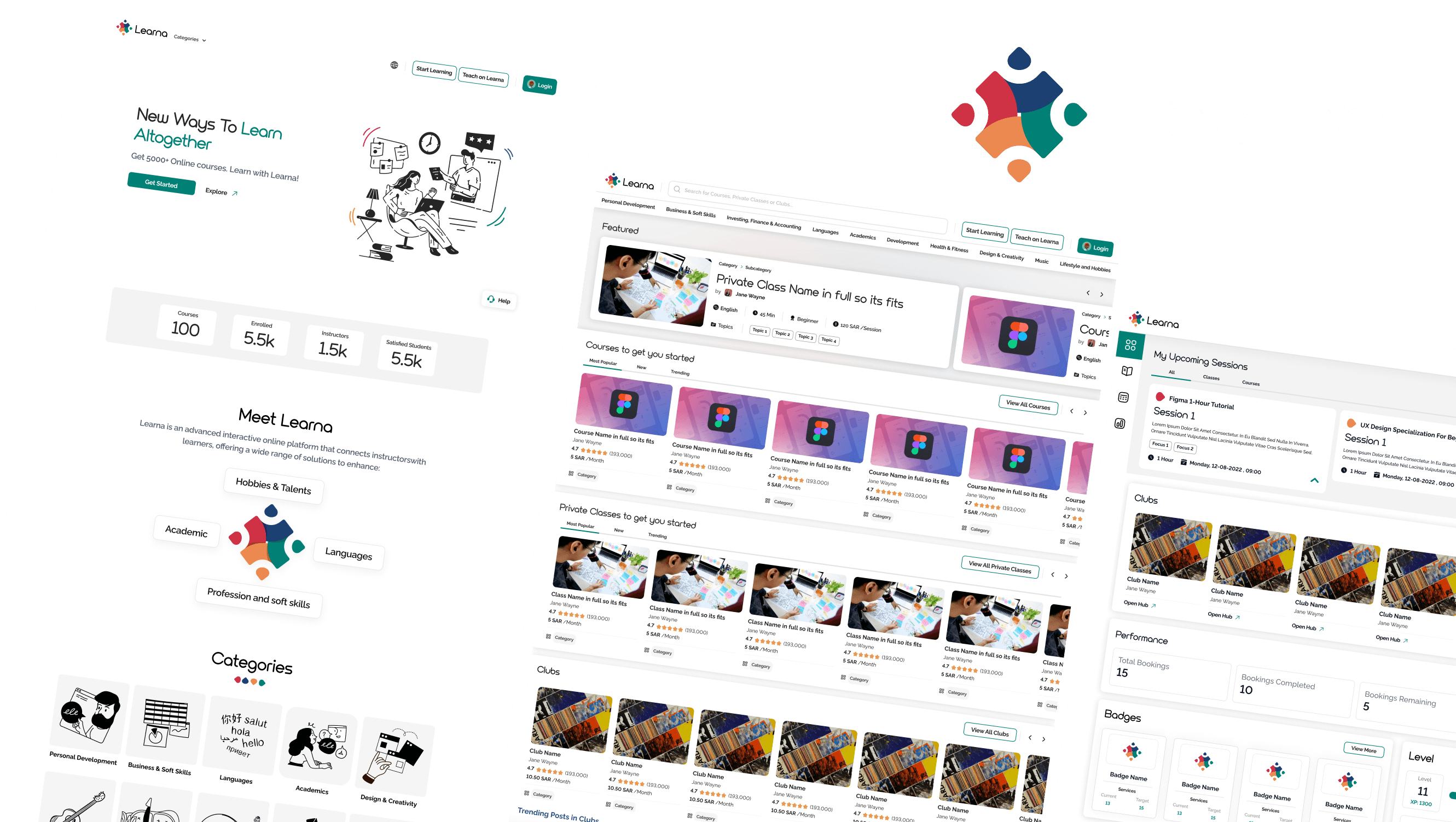
My Role: Sole Designer — Sand and Bricks Discovery, User Flows, Wireframing, UI Design, Bilingual LTR and RTL Design System, Course Booking Automation Flows
Client: GCC-based LMS client
Platform: Marketing website, instructor web dashboard, learner web dashboard, responsive mobile web (instructor and learner), mobile app design system and wireframes
Timeline: 4-month engagement across 3 modules
Status: Website and web dashboards design-complete and locked. Mobile app UI completed by follow-on team using the handoff design system.
Context
Learna is an all-in-one learning management system serving three distinct service types: structured courses (broken into Multi-Session, Single-Session, and Ongoing types), private one-to-one sessions, and peer community clubs. The platform serves instructors who create and manage services, learners who discover and enrol, and an admin layer overseeing the platform. Full bilingual support for English (LTR) and Arabic (RTL) was a product requirement, not a feature option. The most technically complex work — automating the course and private class booking flow — became the defining design challenge of the final engagement phase.
The Problem
The client's existing logic was fragmented: courses managed in one system, private sessions scheduled in another, community features in a third. Instructors had no unified dashboard. Learners had no single place to manage their learning journey across all three service types. Adding the bilingual requirement and a 6-platform scope with an initial 1-month timeline estimate meant the scope was significantly larger than framed — and managing that reality was as much a design challenge as the product itself.
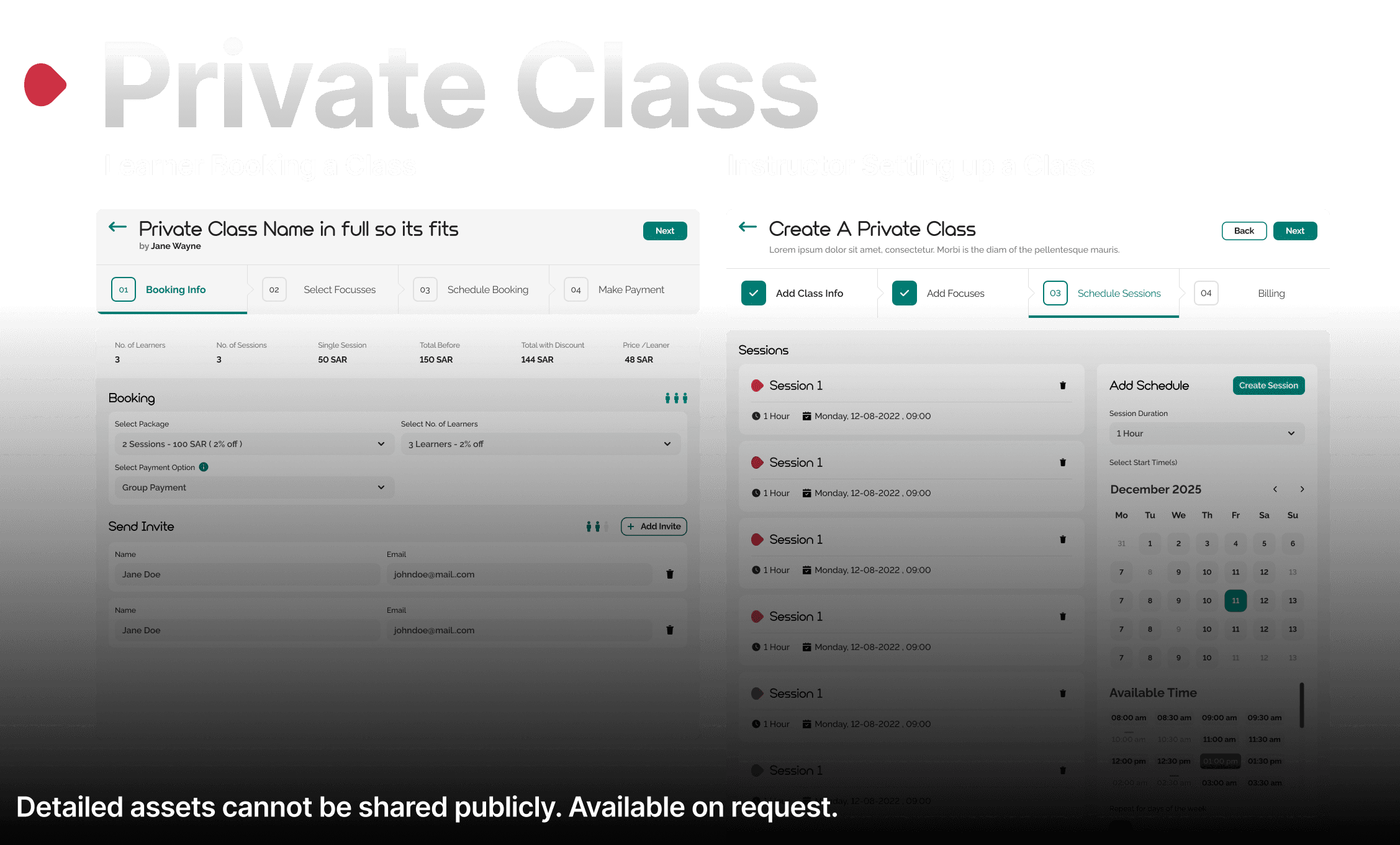
A specific operational problem emerged in the final phase: instructors had to manually input every individual session date and time for a course. For a 12-week programme with 3 sessions per week, that was 36 manual entries per group before a single learner could book. This was the last major design problem solved before handoff.
My Role and Constraints
I was the sole designer on Learna across all phases. I ran the Sand and Bricks discovery session, built the design system from token level up, designed all wireframes, delivered all UI, and handled the full bilingual layout architecture. The most significant constraint was a client who changed direction frequently across both visual design and product logic, combined with internal commercial structures at Code Experts that were not incentivised to enforce timeline. I proposed and enforced a phase-gate structure: Module 1 (Website) locked before Module 2 (Dashboards) began. Module 2 locked before Module 3 (Mobile).
Discovery Process
The engagement began on December 29 with a Sand and Bricks session — a structured preference-gathering exercise where I presented existing UI references and worked with the client to categorise them as aligned or not aligned with their vision. This produced a clear directional brief before any design work began. A first design pitch covering two landing page directions was submitted January 29, revised in a live call, and paused to complete wireframing. The wireframe phase ran for 2 months with significant scope drift driven by frequent client direction changes. Module 1 UI was finally locked on March 15 after a 3:40am working session — a reflection of the commitment level required to deliver this project.


Key Design Decisions
Decision 1: RTL built into the token and component architecture from day one
The standard approach to bilingual design is to build one direction and mirror it at the end. This always produces errors: icons mirror incorrectly, text alignment breaks inconsistently, navigation inverts partially. I built the design system with Arabic RTL as a first-class consideration at the token level from the first component. Every component was tested in both LTR English and RTL Arabic before being added to the library. This added time in the early phase but eliminated all RTL rework in Modules 2 and 3.
Decision 2: Phase-gate approval structure for the UI phase
After two months of wireframe scope drift driven by frequent client direction changes and multiple revision rounds on every element, I proposed a written phase-gate structure for the UI phase: Module 1 locked in writing before Module 2 began. Module 2 locked before Module 3. This was a process design decision, not a UX decision. It protected the design integrity of three mutually dependent modules and prevented changes to Module 1 from cascading across two months of downstream work.
Decision 3: Group-and-batch automation model for course scheduling
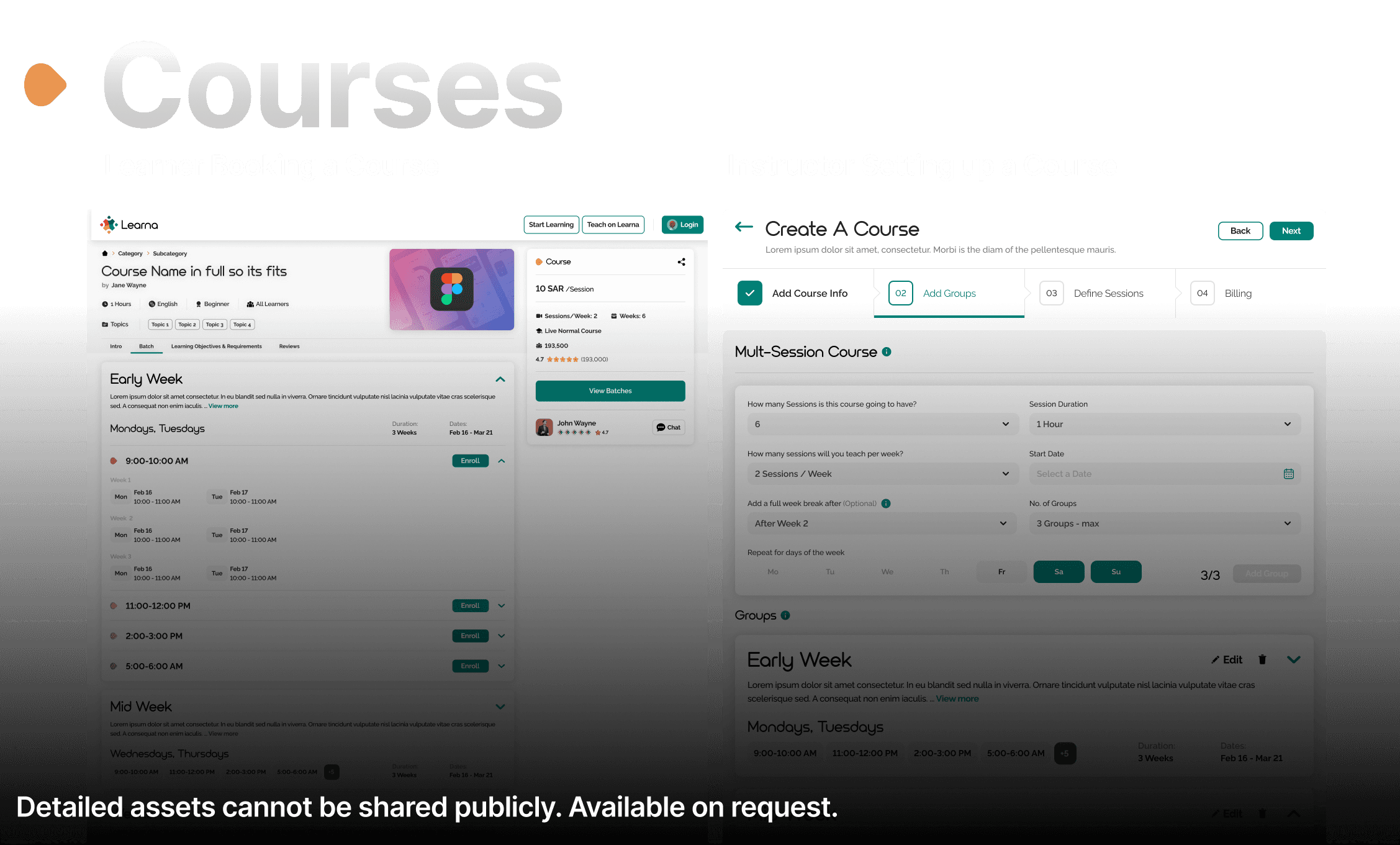
The original course creation flow required instructors to manually enter every session date and time. I designed a group-and-batch model: the instructor defines a recurring schedule logic once (group name, days, time slots, repeat count), and the system generates all session instances automatically. The instructor sees a live schedule preview before publishing, allowing verification without requiring manual entry. This reduced typical course setup time from 30 to 40 minutes of manual entry to under 5 minutes of configuration.
The Solution
Learna delivers a unified learning ecosystem across six platforms with full bilingual LTR English and RTL Arabic support.
Marketing Website: Instructor and learner acquisition with separate value propositions. Course, private session, and club discovery for learners. Service-specific visual identity differentiators.
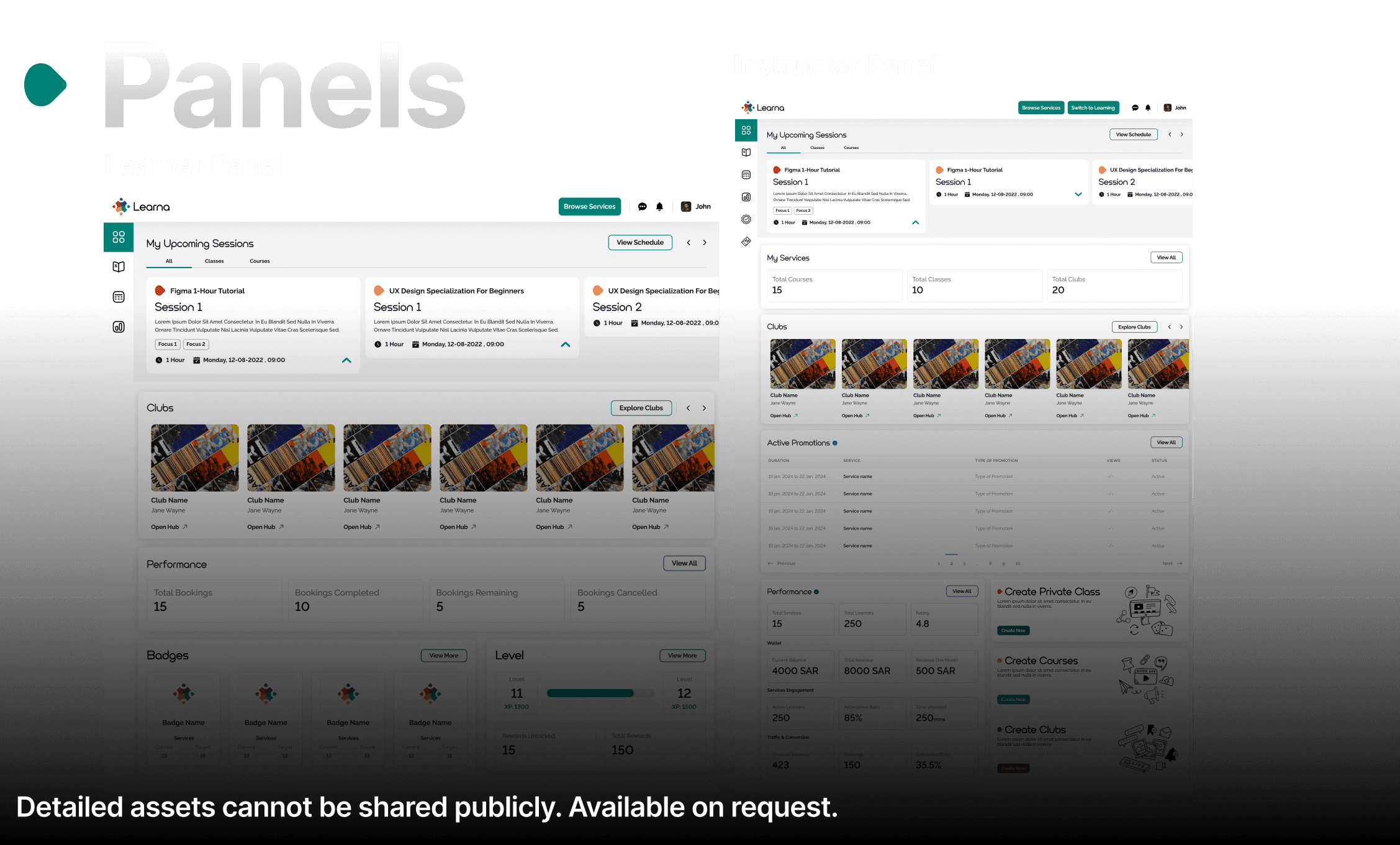
Instructor Dashboard: Three automated course scheduling models (Ongoing, Multi-Session, Single-Session) with group-and-batch configuration and live schedule preview. Private session availability and booking management with time zone display. Club creation and community management. Analytics, earnings tracking, and learner management. Bilingual content publishing.
Learner Dashboard: Course discovery and enrolment across all three course types. Private session booking with time zone-aware calendar. Club membership and community participation. Progress tracking, badges, and rewards. Payment and subscription management.
Responsive mobile web versions of both dashboards covering the full feature set of their desktop counterparts.
Mobile app design system and wireframes: complete token architecture, component library, and interaction patterns handed off to a follow-on team who completed the mobile app UI without requiring system redesign.

The Three Course Types
The defining design challenge of the final engagement phase was automating the course and session booking flow. Three distinct course types were designed, each with different scheduling logic:
Ongoing Course: An open-ended course with recurring group sessions. Instructors define a group name and schedule (e.g. "Early Week: Mondays and Tuesdays"), add time slot batches (9:00-10:00AM, 11:00-12:00PM, and so on), and set a number of repeat weeks. The system generates all session instances automatically. Multiple groups with different schedules (Early Week, Mid-Week, Weekend) run simultaneously within one course, each with independent batch configurations.
Multi-Session Course: A fixed-duration course with a defined number of sessions and a start date. The instructor configures group schedules and batches — the system generates all sessions from the start date through completion. Same group and batch architecture as Ongoing, but with a defined end point.
Single-Session Course (One-Session): Independent sessions bookable individually, not as a package enrolment. Each session has its own name, duration, calendar-based date and time selection, day-of-week repeat rules, and a repeat window (e.g. 12 weeks). Unlike grouped courses, these sessions are standalone and do not share a common enrolment or schedule.
All three course types share the same 4-step creation flow for instructors: Add Course Info, Add Groups (or Add Sessions for Single-Session), Define Sessions, Billing.
Outcome and Impact
The website and all web dashboards were locked, approved, and handed off with full design system documentation covering the bilingual token architecture, all component states in LTR and RTL, and the complete course booking automation flows. The design system was adopted by a follow-on team who completed the mobile app UI without requiring any system rebuilding. Engagement duration: 4 months as sole designer across 6 platforms, 3 course type automation flows, and a complete bilingual design system.
Reflection
The course booking automation was the most satisfying design problem of this engagement. It took something that felt like a data entry task — building a course schedule — and reframed it as a configuration problem with a clear preview and confirmation model. The difference for instructors: instead of spending 40 minutes manually entering every session before they could even see if the schedule was right, they configure the logic in under 5 minutes and review the full generated schedule before committing. That is the kind of UX impact that does not look impressive in a static mockup but fundamentally changes how a product is experienced every single day. Design the rule. Let the system do the work.
Disclaimer: The project discussed herein was undertaken as a part of the Code Experts team. The rights to this project are jointly owned by the client and the studio. This case study is presented solely to showcase my individual contributions to the project.
